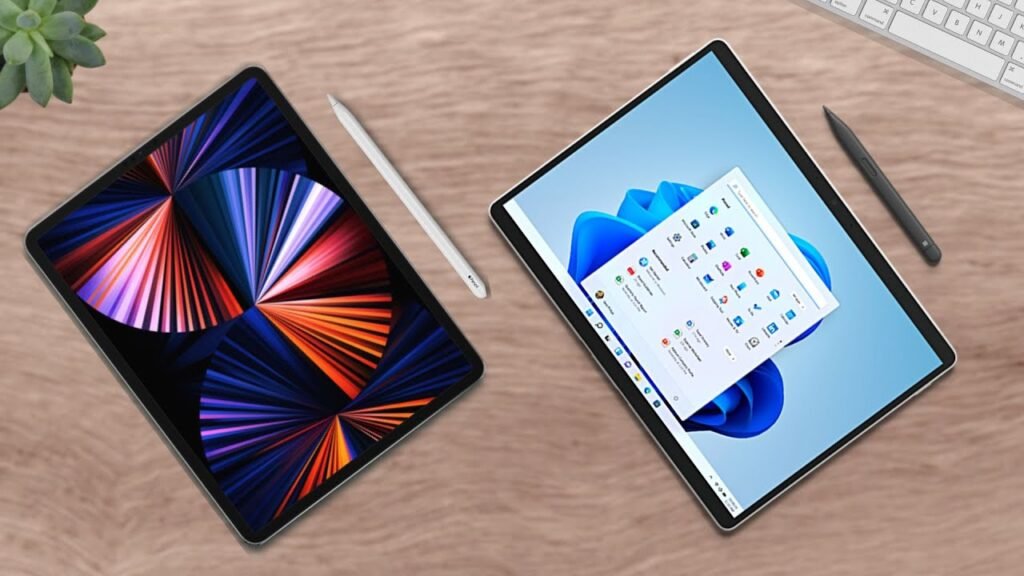
This is a laptopy tablet: And this is a tablet laptop: Which is better? The Microsoft Surface Go 3 vs Apple iPad Air 5. For general comparison, let’s go over the raw stats.
Device Overview and Positioning
The Surface Go 3 is Microsoft’s famous 2-in-1 laptop that acts like a tablet. It starts at an extremely reasonable $400, but to make this comparison fair, we’re actually going over the $630 version. But, don’t worry. I’ll still bring up the starter model a little bit.
The iPad Air 5, on the other hand, is a mostly tablet from Apple that can kinda act like a laptop, starting at $600. Keep in mind that both devices have their own different purposes so their features are going to be skewed toward those, such as form factor.
Display and Portability
The Surface Go 3 is a 10.5 inch little laptop with a convenient kickstand and a good looking screen, but the iPad Air just blows that display out of the water. The tablet’s screen is certainly superior, being larger and better looking overall, with a higher PPI and Apple’s True Tone.
Connectivity and Camera Quality
For connectivity, there’s also a clear winner. The Surface Go 3 has a far larger variety of ports, compared the iPad Air’s only single USB-C. Now, it’s important to note that, for typical laptop users, you generally should want more ports, maybe even more than the Surface Go 3 offers. But, for tablet users though, eh that’s up to your discretion. I, personally, would like a headphone jack and maybe an extra USB port, but that’s up to you.
Next, cameras. Now, I know what you’re going to say… Who uses a camera on a tablet? Well, first, me. And, if you’re working on certain projects that need visuals or if you’re in, let’s say, a Zoom call, You might want to keep in mind your camera quality. And both are adequate. But, the iPad Air does have Apple’s Center Stage feature, which will keep you in frame as you move around. Kinda a gimmick in my opinion, but I see that it can be certainly helpful for people depending on your line of work. May be even helpful for me if move around.
Internal Specs and Performance
For internal specs, both devices have good-performing internals that’ll help you complete all of your work. And the Surface Go 3’s starter configuration is actually not bad. I’ll show you the graph in a second.
But, as expected with this configuration, the Surface Go 3’s CPU is an upgrade and it’s pretty good. It can certainly complete any documentation-type work that you have, such as Excel. But, for things like editing, it may struggle a little bit.
The iPad Air, on the other hand, is seriously overkill. It comes with the Apple M1 Chip, which it also uses for the iPad Pro line and even some MacBooks. So, if you want power, definitely check out the iPad. But, but but! Keep in mind device limitations because, you could have the most powerful device in the world, but, if it can’t run your programs, you shouldn’t buy it.
Storage Considerations
Now, as with many devices, I am always frustrated with storage because it is rarely adequate. And both of these are… not great.
The Surface Go 3’s starter configuration comes with 64 gigabytes, but this version ~woohoo~ comes with 128, so it’s not great in layman’s terms. But, it does come with a MicroSD card slot, so you can add storage if you need it.
The iPad Air, on the other hand… Naw naw, not ~great~. 64 gigabytes and the upgrade for more storage is $150 more. You can get a dongle to attach a MicroSD card slot to the tablet, but that can get a little inconvenient for you, so keep that in mind.
Software and Operating Systems
Now, as I stated, these devices are just built different. What I mean by that is they run different operating systems. The Surface Go 3 runs Windows while the iPad runs iPadOS, so the Surface Go 3 can run anything a typical computer can, while the iPad can run anything a typical iPad-tablet can.
Some proprietary programs for computers, such as games, cannot be run on the iPad. And that’s the same the other way around. So, before making a purchasing decision, keep in mind the things you’ll be running on these devices.
Reviewer Acclaims and Criticisms
Here are some reviewer acclaims and criticisms about these devices:
-
Surface Go 3: Praised for its portability, battery life, and Windows security features. Critiqued for its operating system’s lack of tablet integration, performance, and connectivity.
-
iPad Air 5: Praised for its screen, performance, and camera. Critiqued for its operating system, battery life, and security features.
Final Recommendation: Which One to Buy?
Well, well, well as I’ve discussed in every article I make, it really comes down to your needs, specifically your needs, not just your wants. So, what do you need? And what fills that need?.
For instance, you may need something to be able to take with you to work on projects. And you may need a computer for that, say the Surface Go 3. Or perhaps you want a device that you can use for leisure, something you can play games on and also watch movies with. For that, you might want to get the iPad Air 5.
But, what about the person who wants to combine work and leisure? Well, this is where things get a little muddled because, as we’ve discussed, you can’t do everything on either device. The Surface Go 3 is great for computer stuff, while the iPad Air 5 is great for tablet stuff. We’re clear on that.
But, if you want something that can do both, things get a little bit more complicated, But, I would recommend the Surface Go 3. Reason being is that, even today, you can do more on a computer than you can on a tablet. And the Surface Go 3 is a 2-in-1 after all.
But, for my Apple purists, I understand the issue with not wanting to branch out of your current ecosystem. Apple does provide some incredible apps, but maybe check out other tech if you’re comfortable. But, if not, stay tuned for my iPad Pro vs Surface Pro 8 article coming soon.
Ultimately, all of this is your decision based on your preferences. My name is Cyrus. It’s spelled like “Cyrus,” pronounced like “See Rooster,” just take out the “ter.” Thank you very much for reading, good luck with your purchase, and have a wonderful day!