Introduction (What is Venmo)
Venmo is a popular peer-to-peer payment app today where people can easily send money to their friends, family, or businesses. But when it comes to security and account verification a common question comes to users mind that: Does a Venmo Asked For Last 4 Digits Of Your Phone Number? In this article, we will take a closer look at when and why Venmo asks for the last four digits of your four numbers, its purpose, and how you can avoid scams. This guide is easy for beginners and will be useful for advanced as well.
Introduction to Venmo and security verification
Venmo is a mobile payment service that operates under PayPal. Whenever a financial app is used identification, verification, and account security is important. That is why Venmo verifies whether the person using the account is genuine or a fraudster. For security verification Venmo sometimes asks for the last four digits of a verified phone number.
Yes, Venom sometimes asks for the last 4 four digits of a phone number but not always. This mainly happen when:
- You login your account to a new device or you login from a new location.
- Venmo detects suspicious activity on the account.
- When you have to receive a verification code or system wants to confirm that the phone number is the same as the one you registered.
Why does Venmo ask for last four digits of phone number
Now, the question arises that Venmo specifically Why does he ask for the last 4 digits of a phone number?
1.Identity verification
Venmo ensures that the person logging in is the real account holder. Simply asking for the last 4 digits of the phone number confirms that your phone number matches their records.
2.Extra security layer
Financial apps require layers of security. Venmo adds extra security steps like phone number verification. Even if a hacker gets hold of your Email and password.
3.Preventing fraud
Scammers frequently attempt to hack your account. The last four digits of your phone number are a simple and quick way to detect fraud.
Common scenario of Venmo where 4 digits of phone number are required
Let us look at some practical situations where you can see these steps.
1.New device Login
If you have used an iPhone before and now log in with an Android device, Venmo will verify that it’s you.
2.Password reset
When you use the forgot password option, Venmo asks you for the last 4 digits to confirm your phone number.
3.Suspicious activity
If Venmo detects unusual transactions taking place on your account, it will confirm via phone number.
4.Account linking
Sometimes when you transfer your Venmo account to someone’s new bank account, even if you link it to a bank or card, phone number verification is required.
Is this process safe
Yes, it is safe if you enter directly to the Venmo app or Venmo official website. But if someone sends you a link via email or text and asks for the last 4 digits then understand, it could be a scam.
How to identify Venmo scams related to phone number
In today’s digital era scammers are becoming smarter. Therefore, it is important to always be clever.
1.Phishing Emails
Fake Emails appear to be from Venmo and ask for your last 4 digits or OTP. Always avoid these.
2.Fake customer support calls
Scammers sometimes call customer support and ask for confidential details. Real Venmo will never call you and ask for your last 4 digits.
3.Suspicious links
Never enter your details by clicking on an unknown link. Always use the Venmo app or official website.
Why Venmo Prioritizes Phone Number Verification
If you think about it, your phone number is one of the most personal things linked to you. Venmo uses it as a simple but powerful way to make sure the account belongs to you. Whenever Venmo detects an unusual activity it asks you for last 4 digits of your phone number. Venmo confirms that you are using your account not another person accessed your account. Verification of phone number is also beneficial because Venmo can send OTP. It is because if anyone knows your password he cannot access to your account without OTP. This step is little bit longer and difficult but it is secure for your money and personal details.
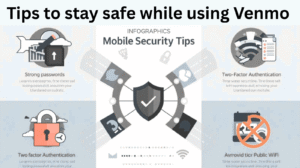
Tips to stay safe while using Venmo
Some tips will keep you safe just follow them:
- Always download the official Venmo app
- Enable two-factor authentication
- Avoid easy passwords and keep your password strong
- Check Emails and SMS carefully. Spelling mistakes are sign of scams
- Avoid public WIFI whenever financial transactions have to be done
FAQs about Venmo
Q1: Does Venmo always ask for the last 4 digits?
No, Venmo only asks for 4 digits when you are logging in a new device, suspicious activity or password reset.
Q2: Do I have to give my complete phone number to Venmo?
No, Venmo requires only the last 4 digits, the full number is already saved in your profile.
Q3. What is right to do if I receive a message asking for the last 4 digits?
If the message is from the Venmo app or official website then enter your last 4 digits otherwise, if it is Email or SMS then ignore it.
Q4. Can Venmo work without a phone number?
The phone number is required to set up Venmo, and OTP and verification take place there.
Q5. What if my phone number changes?
By logging into your account you can update your phone number.
Also Read
Digital Gift Cards (Amazon, Google play, etc)
Trusted Digital Remittance Companies
My opinion
Sometimes Venmo asks you for the last 4 digits of your phone number. This is primarily for security and identity verification. But it is important to avoid scammers. This is a safe process if you are directly using the Venmo app or official website. To keep your Venmo account safe do not share your password or details to third party websites, fake calls or suspicious links.